Ohio Business Entity Search

The Ohio Business Entity Search is the official online tool from the Ohio Secretary of State’s Office that lets anyone look up a company registered in the State of Ohio.

Fastest National Processing Times!

You can view filings, formation dates, agent details, and business status in a single, clean dashboard. For entrepreneurs, it’s the first stop before forming a new venture, ensuring your chosen name is unique and compliant with state law.

According to the Business Services Division, over 170,000 business entities were filed in Ohio last year, a strong sign of the stateโ€™s thriving startup climate. This public business records Ohio database makes due diligence effortless. Whether youโ€™re verifying an LLC, corporation, partnership, Sole Proprietorship , Professionally Limited Liability Company , Non-profit Organization and Doing Business As (DBA) the platform keeps your business setup accurate, legal, and transparent. Every search saves you time, money, and future headaches.

 You can find filings, registered agents, active or inactive status, formation dates, and certificates of good standing, all accessible through the Ohio Secretary of Stateโ€™s official website.

Ohio Business Entity Search Step-by-Step Guide 

Conducting an Ohio Business Entity Search is the first step in checking your business name before registration. It’s all done on the Ohio Secretary of State website, the one place that keeps the official master list of every business in the state. Best part? This Ohio business lookup is 100% free, lightning fast, and saves you from the heartbreak of a rejected filing.

In 2024 alone, Ohio welcomed 173,643 new businesses (Ohio Secretary of State Annual Report, 2024), underscoring the importance of securing your name early. That’s why grabbing your name early is pure gold. Skip the drama and lock it in before someone else does.

Before you drop $99 on your Articles of Organization, you can just run this search. One quick check confirms your name is unique, legal, and ready to roll. No nasty surprises, no wasted cash, just smooth sailing into your Ohio empire.

Here’s the dead-simple way to nail your SOS Business Search Ohio and crush that Ohio LLC lookup, takes under 2 minutes, keeps everything clear, compliant, and verified

Here’s. how you can use the SOS Business Search Ohio system to perform an Ohio LLC lookup the right way.

 Step 1: Go to the Official Business Search Page

Visit https://businesssearch.ohiosos.gov/ Ohio Secretary of State Business Services website. Look for the Business Search option, thatโ€™s the stateโ€™s official platform for checking business names and filings.

Step 1: Go to the Official Business Search Page on the Ohio Secretary of State website, businesssearch.ohiosos.gov.

Step 2: Click on โ€œBusiness Searchโ€

Once on the page, select โ€œBusiness Search.โ€ Youโ€™ll land on the Ohio Business Name Search database, where every active and inactive company in Ohio is listed.

step 2 for ohio-business-entity-search: clicking the "Business Search" button.

Step 3: Type Your Desired LLC Name

In the search bar, enter your preferred business name exactly how you plan to use it. The Ohio LLC lookup system will instantly display similar names to help you spot duplicates.

Step 3 for the Ohio business entity search: A hand is shown typing the desired LLC name into the search bar on the website.

Step 4: Review the List of Results

Scroll through the results. If you see a business with the same or similar name, it means the name isnโ€™t available. If not, youโ€™re in the clear. Click any listing to see more details about that entity.

Step 4: Showing the results list from the Ohio business name search, instructing the user to review the list.

Step 5: Check the Filing Details

This section shows key facts โ€” entity type, registration date, status, and agent name. Itโ€™s everything you need to confirm whether your name is free for use in the Ohio company search system.

Step 5: Final step of the Ohio business entity search, which is checking the specific filing details of a business.

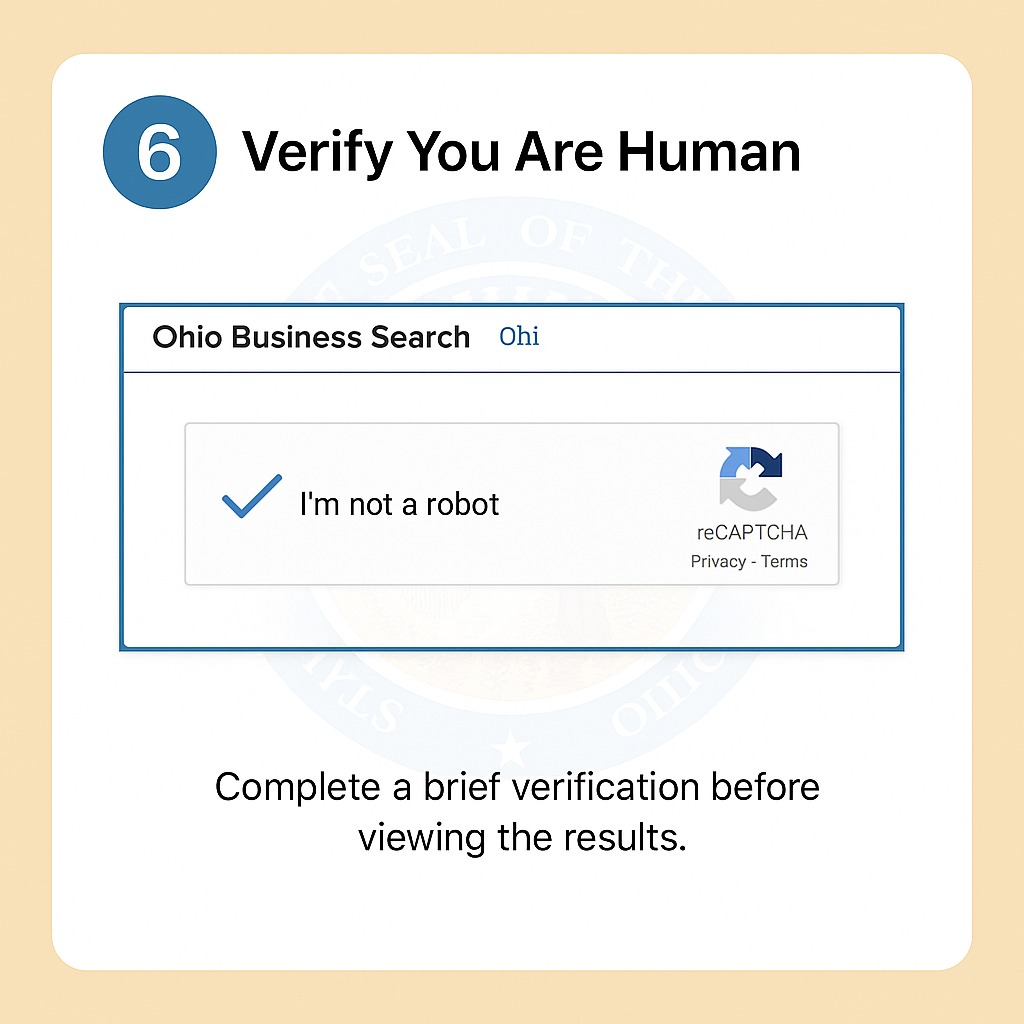
Step 6: Verify You Are Human

Before the page loads fully, you may be asked to complete a quick check, a simple โ€œverify you are humanโ€ box. Itโ€™s just a brief security step before the results appear.
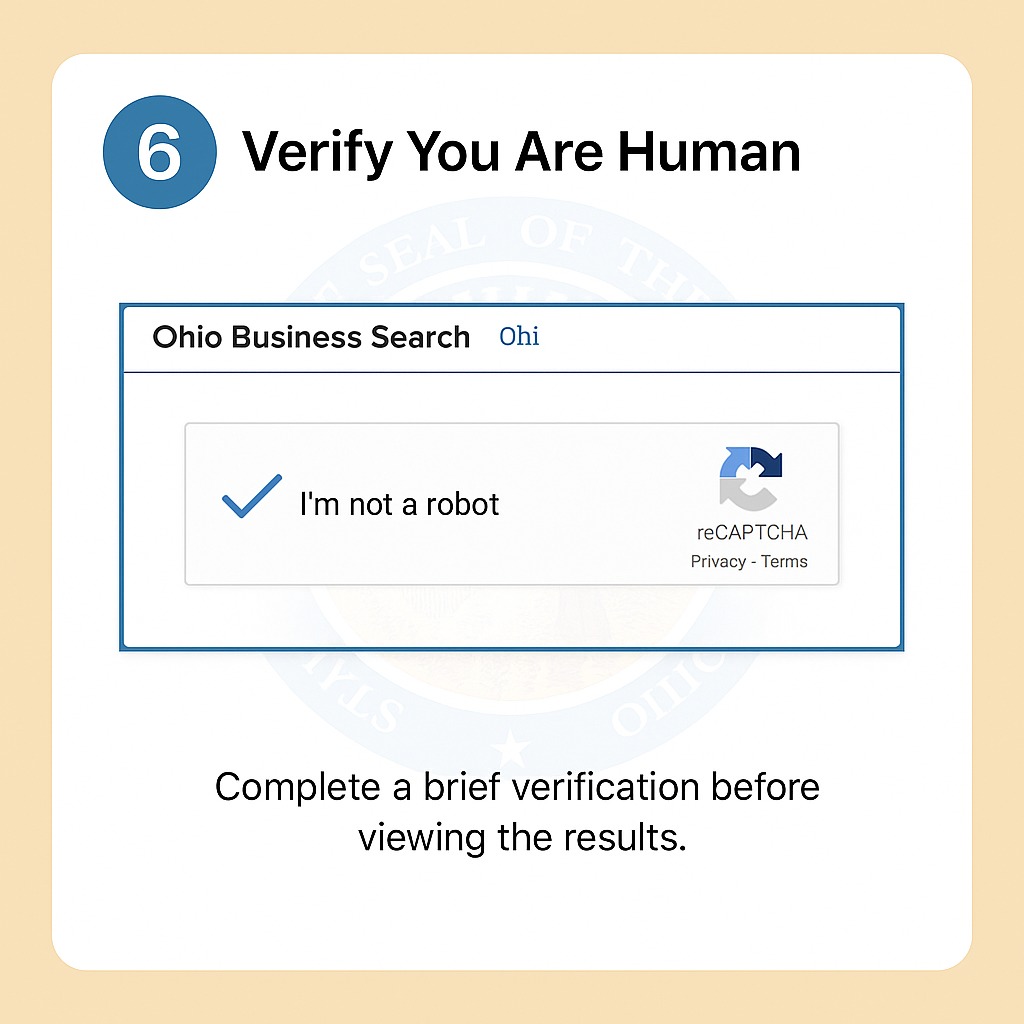
Step 6: Screenshot showing the human verification or CAPTCHA screen that the user must complete before submitting the Ohio business search.

Step 7: Save or Print for Your Records

If your name is available, save or print the results.  You will need this assurance when you submit your LLC formation paperwork to the Secretary of State.
Step 7: Instruction to save or print the Ohio business search results for your records.

If you have trouble loading the page, refresh your browser or try again later. The site periodically maintains checks, which may temporarily slow down access..

Using the Ohio Secretary of State’s Ohio Business Search takes minutes but saves hours of future hassle. 

You may be a new owner or an existing owner of a business, since this is a quick business owner lookup in the state of Ohio, it keeps your startup organized, operational, and always ready to start.


Section on performing additional checks after completing the Ohio business entity search.

Trademark Check (Legal Protection)

Go to the USPTO Trademark Search and confirm your name or logo isnโ€™t registered elsewhere. It protects your business at the national level and prevents future legal conflicts.
Example: โ€œCedar & Co. Coffeeโ€ might be clear in Ohio, but if itโ€™s trademarked federally, you could face a name dispute later.

Domain Name Availability (Online Presence)

Check your domain on GoDaddy, Namecheap, or Google Domains. Secure a .com if possible, or try variations like .co or add โ€œOhioโ€ at the end.
Example: If โ€œSummitSweets.comโ€ is taken, โ€œSummitSweetsOhio.comโ€ works perfectly.

Social Media Handle Check (Brand Consistency)

Search your name across platforms like Instagram, LinkedIn, and X. Keep your handle consistent; it helps customers find and recognise you easily.

Professional Email Setup

Once you own your domain, create a business email such as info@YourBusiness.com. It looks professional and keeps communication organised.

Record Keeping

Save your Reference ID or Control Number from the state search. Download and store your filing receipts, both digitally and on paper.

Pro Tip:
Run your name through three filters, the Ohio Secretary of State Search, USPTO Database, and a domain registrar. If itโ€™s clear in all three, your brand is legally safe, unique, and launch-ready.

Inside the Ohio Entity Search Portal โ€“ Essential Insights for LLC Filings ( LLC Lookup in Ohio)

 Ohio Entity Search: Key Insights for Your LLC Lookup in Ohio 

An Ohio Entity Search is essential before starting your business journey. When you perform your LLC lookup in Ohio, you’re using the Ohio Secretary of State’s official Business Entity Search Portal. This trusted tool connects directly to the state’s public filing system. This online Business Filings Database gives you instant access to verified business information across Ohio.

When you search a business on the Ohio Secretary of State’s Office’s official Business Entity Search Portal, you tap into the state’s public filing system, part of its online Business Filings Database.  This tool shows you key facts about any company registered to do business in Ohio, as well as incorporated entities, LLCs, and partnerships, all in one place.

Among the details you’ll see: Entity Type, Registration / Control Number, Filing Status, and Filing Date. Think of the ID number like a social security number for the business unique and traceable. Status tells you if the company is โ€œActive,โ€ โ€œCancelled,โ€ or otherwise. The type field helps you determine whether itโ€™s a domestic LLC, a foreign corporation, or another entity.

Hereโ€™s a sample of how  Business Entity Information appear:

  • Entity Name: BrightPath Consulting LLC

    • ID Number: 5012345

    • Status: Active

    • Filing Date: 03/12/2023

  • Entity Name: RiverStone Holdings LLC

    • ID Number: 4987602

    • Status: Cancelled

    • Filing Date: 08/21/2021

  • Entity Name: NorthEdge Solutions LLC

    • ID Number: 5078103

    • Status: Pending

    • Filing Date: 11/05/2024

๐Ÿ“˜ Note:
On the detail page of each entity, look for the field โ€œAuthorised to Transact Business in Ohio.โ€

  • This line confirms if the business is legally allowed to operate in Ohio.

  • It also indicates whether the filings have been approved.

Ultimate Ohio Business Search – Visit the Official Portal for Verified Records

The Ultimate Ohio Business Search begins at the Ohio Secretary of Stateโ€™s official website, the only trusted source for verified business information. The portal houses the complete Business Records and Filing Archive, storing every public filing for registered companies in Ohio. You can look up entities, verify filing status, and confirm registration details, all directly from the state’s online database.

Use the site to confirm that your business details are up to date and compliant before filing new documents. Itโ€™s the fastest, most reliable way to verify information directly from the stateโ€™s verification system.

You can check:

  • Entity ID: View your companyโ€™s unique identification number.
  • Filing History: Review all official submissions.
  • Agent Address: Confirm the registered agentโ€™s contact details.

๐Ÿ’ก Tip: Bookmark the official Ohio Business Search Portal itโ€™s your go-to spot for quick, verified business checks anytime.

Ohio Corporation Lookup – Access Business Filings Instantly

Looking for official company details in Ohio? The Ohio Secretary of State’s Office Filing Division makes it easy through the Ohio Corporation Database. This state-verified system lets you perform a corporate search instantly and access key business filings. In 2022, Ohio recorded 179,636 new business filings, underscoring the system’s activity for entrepreneurs. 


Ohio Corporation Lookup tool to instantly access business filings.

 How to Conduct a Corporation Search (Quick Steps)

  • Step 1: Go to the Business Filings section on the Secretary of State’s website and select โ€œCorporation Searchโ€.
  • Step 2: Type in the company name or its entity ID number.
  • Step 3: Use the filters to narrow your results by status, filing date, or location.
  • Step 4: Click the company name to open its record you’ll see formation date, agent name, status, and other key details.
  • Step 5: If you need certified copies or official documents, select the โ€œRequest Certified Copyโ€ option or contact the Filing Division.

Example Record

  • Company Name: Buckeye Manufacturing Corp

  • Entity ID: 4129876

  • Status: Active

  • Filing Date: 04/10/2022

๐Ÿ“˜ Note:

  • If you prefer physical or notarized copies, you can email or visit the Filing Division in person.

  • They handle document retrieval and certification requests for legal or compliance purposes.

Key Benefits of Using the Ohio Business Lookup Online

The Ohio Business Lookup Online makes business verification effortless for anyone starting or managing a company in the state. Through the Ohio Secretary of Stateโ€™s Office, the platform connects users to the official Business Information Database, a reliable resource within the State of Ohio Portal. It’s where you can confirm filings, review company information, or download compliance records, all in just a few clicks.

This tool is more than a search bar; itโ€™s a time-saver for professionals who rely on accurate, state-verified data. Small-business owners use it to confirm registrations, real estate agents check corporate standing before deals, and accountants track client filings with ease.

By using the Ohio Business Lookup, youโ€™re tapping into a trusted, always-updated system that simplifies business management. It keeps your work efficient, your records accurate, and your operations fully aligned with Ohioโ€™s business standards.

key benefits and advantages of using the official Ohio Business Lookup tool online

Here’s how the system actually helps in practice:

Speed That Keeps You Moving

You can search any company name and see results instantly. Imagine youโ€™re registering โ€œMidwest Auto Works LLCโ€ ,a quick search tells you if the name is available before you pay a single fee. No waiting, no paperwork. Just results, right when you need them.

Free Access, Anytime

No paywalls. No forms. The state keeps the Business Information Database open to everyone. Letโ€™s say youโ€™re a new entrepreneur checking competitors before filing  you can look up as many names as you want, completely free, even from your phone on a lunch break.

Accurate, Verified State Data

The database pulls directly from authorized filings submitted to the Secretary of State. That means that when a lender or investor requests your official registration, the data they see matches exactly what you see. It removes doubt, and that’s priceless when building credibility.

 Downloadable Records for Real Use

Need proof of registration for a business loan? Or a certificate of good standing for a licensing board? You can download those documents instantly. Many small-business owners keep digital copies for audits, permits, or renewals, saving hours of back-and-forth later.

State of Ohio Business Search for Smart Entrepreneur

The State of Ohio Business Search is the go-to tool for every smart entrepreneur ready to launch a company in Ohio. Managed by the Ohio Secretary of State, this official online system provides quick access to verified business information straight from the stateโ€™s database. Itโ€™s the simplest way to ensure your business name and filings are accurate before taking the next step.
Official State of Ohio Business Search tool as a smart resource for entrepreneurs planning their business.

With the Secretary of State Ohio Business Search, you can filter results by filing type, status, or registration number. Need an Ohio corporation search or an Ohio business license search? Youโ€™ll find everything in one place, including the reference ID listed for each record, making follow-ups and document requests easy.

For new owners, the State of Ohio LLC Search or LLC lookup Ohio confirms that your chosen name is unique and ready for approval. Itโ€™s the simplest way to avoid conflicts and keep your business filings compliant from day one.

Search Types and Their Purpose

  • Business Name Search

    • Purpose: Check if a name is available

    • What Youโ€™ll Find: Existing or similar business names

  • Entity Number / ID Search

    • Purpose: Track filings or updates

    • What Youโ€™ll Find: Entity number, reference ID, and status

  • Filing Lookup

    • Purpose: View submitted reports or certificates

    • What Youโ€™ll Find: Filing history and amendment

Ohio LLC Search Tips - Contact the Secretary of State for Filing Information

How to Get Help

  • ๐Ÿ“ง Email:
    • Send your request to business@ohiosos.gov
    • Include your business name, entity ID, and reference ID in the subject line

    Example:

    Subject: Reference ID Help โ€“ Buckeye Consulting LLC (ID: 5012345)
    
    Message:
    Hello,
    Iโ€™d like to verify the filing status and reference ID for my business, Buckeye Consulting LLC. 
    Please confirm if my latest submission was received successfully.
    
    Thank you,
    [Your Full Name]
    [Your Contact Number]
          
  • ๐Ÿ“ž Phone:
    • Call 877-767-3453 (toll-free)
    • Available Monโ€“Fri, 8 AMโ€“5 PM ET
    • Real humans answer in seconds โ€” just say your entity number and theyโ€™ll help immediately
  • ๐Ÿข In Person:
    • Visit: 180 E Broad St, 16th Floor, Columbus
    • Tip: Bring coffee โ€” they deserve it! โ˜•
  • โœจ One Magic Trick:
    • Always lead with your Entity ID (7-digit number)
    • Boom โ€” fixed before you finish your sentence!
  • โš ๏ธ Quick Tip:
    • Donโ€™t refresh the page 47 times โ€” just contact them directly
    • Thousands of Ohio business owners do it daily and walk away smiling ๐Ÿ˜„

Your Ohio LLC search is glitching, name missing, status stuck, or some random error? Relax. The Ohio Secretary of State crew eats these problems for breakfast and actually loves helping.

Ohio Business Entity Search FAQs

1. What does the Ohio Secretary of State Business Search do?

Itโ€™s your go-to business owner lookup Ohio style. This free tool lets you dig up official records on any company registered in the state, think formation date, current status, filing history, and more. Perfect for starting a new business or just being nosy about competitors.

2. How can I perform a business entity search through the Ohio Secretary of State?

Super easy. Head to the official site, punch in the entity name, registration number, or even an IP address and reference ID if youโ€™ve got one. Boom, youโ€™ll see company type, address, agent info, and whether itโ€™s active. The page conducts a brief security check real quick (just a captcha thing), then youโ€™re in.

3. What kind of information can I find in an Ohio business search record?

Everything that matters: exact entity name, control number, business type, registration date, status, registered agent, even the full filing history. You can download PDFs of everythingโ€”Articles, amendments, the works.

4. Is the Ohio Secretary of State business search free to use?

100% free. No hidden fees, no account needed for searching. The state just wants you to have easy access to legit records.

5. How often are Ohio business filings updated in the database?

 Pretty much real-time. Once the SOS team approves something, it usually pops up within 24 hours, sometimes faster. No waiting weeks like some states.

6. Can I download documents from the Ohio Secretary of State business search results?

Yep! Click any filing in the results and grab the official PDF instantly. Great for due diligence or just keeping records straight.

7. What should I do if my Ohio business entity record shows outdated information?

Donโ€™t panic. Hit up the Business Services Division, theyโ€™re actually helpful. Theyโ€™ll walk you through the process to file an update and get your record spot-on again.

8. Do I need an account to use the Ohio Secretary of State online services?

Nah, searching is totally anonymous. But if youโ€™re ready to file something new, yeah, youโ€™ll need to create a quick login on their portal.

9. Can I search for multiple business entities at once on the Ohio Secretary of State website?

 Absolutely. Type a partial name or keyword and it spits out a whole list of matches. Super handy when youโ€™re checking name availability or spotting similar businesses before you seek approval for yours.

10. Why should I visit the Ohio Secretary of Stateโ€™s website before filing for a new business?

 Because getting rejected sucks. Run that name check first to make sure itโ€™s unique, dodge any federal trademark surprises later, and save yourself time and money. If you encounter a problem accessing the site (rare, but happens), just clear your cache or try a different browser, the page conducts a brief security check that sometimes trips people up.

Ohio Secretary of State โ€“ Business Services Division
Website: https://www.ohiosos.gov/businesses/
Phone: (877) 767-3453

Physical Address:
Ohio Secretary of State
Business Services Division
180 E Broad Street, 16th Floor
Columbus, OH 43215

Email: business@ohiosos.gov
Office Hours: 8:00 A.M. โ€“ 5:00 P.M., Mondayโ€“Friday
What Our Customers Are Saying
โญ 4.9 out of 5 โ€” based on 1,421 verified reviews
โญ See 1,421 More Reviews on Trustpilot

Start & Grow

Your Dream Business

Join our growing BusinessRocket Family


4.9 Rating 1100+ Reviews

Featured Posts